Klaviyo Silver Advisor partner

Klaviyo for eCommerce:
Set Up, Connected, and Managed

Klaviyo sends the right message when it has the right data. MAK Digital is a Klaviyo Silver Advisor partner. We connect Klaviyo to BigCommerce, Shopify, Magento, and WooCommerce stores, add the tracking the standard integration leaves out, and build the flows and segments that bring customers back.

Silver Advisor
Our Klaviyo partner tier
205,000+
Brands on Klaviyo
350+
Prebuilt integrations

Technology partner

MAK DigitalKlaviyo
  • Implementation and onboarding
  • Migration from another email platform
  • Custom integrations and tracking
  • Email, SMS, RCS, WhatsApp, and push
Partner
Klaviyo
What it is
A B2C CRM: customer data, marketing automation, and customer service in one platform
Channels
Email, SMS, RCS, WhatsApp, and mobile push
Our status
Silver Advisor in the Klaviyo partner directory
Platforms we connect
BigCommerce, Shopify, Magento, WooCommerce, and custom builds
Good fit for
Stores that want more revenue from the customers they already have

MAK Digital is a Klaviyo partner and may benefit when a client chooses Klaviyo. We recommend it when it fits the store, and we work with other email platforms too. Klaviyo figures on this page are from klaviyo.com.

Last reviewed .

The platform

What Klaviyo Is

Klaviyo started as an email tool for online stores and now calls itself a B2C CRM. It keeps one profile for each customer, built from what that person browsed, bought, opened, and clicked, and it uses that profile to decide who gets which message on which channel. Klaviyo reports more than 205,000 brands on the platform and more than 350 prebuilt integrations.

It has three parts. Marketing covers email, SMS, RCS, WhatsApp, mobile push, signup forms, and reviews. Data covers the customer profiles, segmentation, and analytics underneath. Service, the newest part, adds a customer hub, a helpdesk, and an AI agent that answers shoppers.

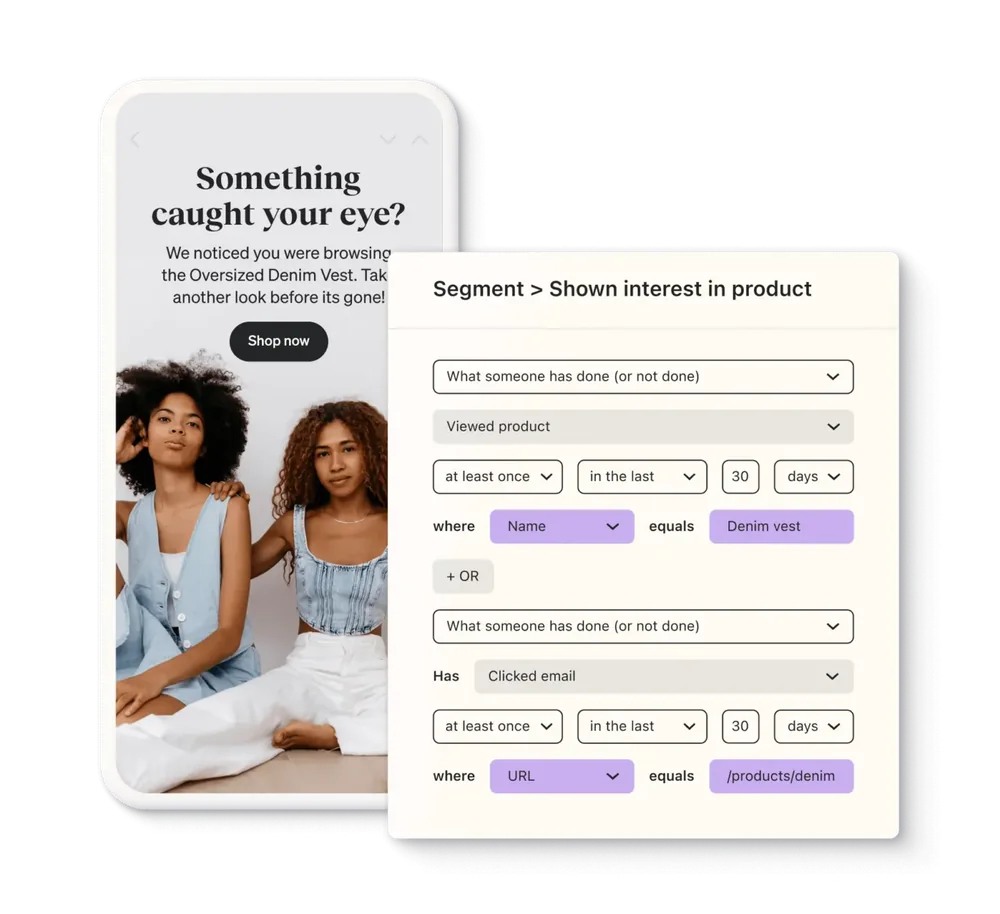
What makes it suit eCommerce is the data model. Every event a store sends, such as a product view, a started checkout, an order, or a refund, can start a message or narrow an audience. The picture shows the idea: a segment of people who viewed a product in the last 30 days, and the reminder they receive.


A Klaviyo segment named Shown interest in product, defined as people who viewed a product called Denim vest at least once in the last 30 days or clicked an email, beside a phone showing the browse reminder email that segment receives
A Klaviyo segment and the message it triggers. Image: Klaviyo.

What it does

What Klaviyo Does for an Online Store

Six capabilities account for most of the value. The first two are where a store should start.

  • Flows

    Messages that send themselves when a customer does something: a welcome series, an abandoned checkout reminder, a browse reminder, a post-purchase follow-up, a win-back. Built once, they run every day.

  • Segments

    Audiences defined by behavior and kept current automatically: first-time buyers, repeat buyers, people who viewed a category, customers who have gone quiet. Campaigns go to the people they fit.

  • Email and SMS together

    One profile and one consent record per channel, so a text and an email never collide. RCS, WhatsApp, and mobile push run from the same place.

  • Forms and list growth

    Popups, flyouts, and embedded forms that collect email and SMS consent and pass each new subscriber straight into a welcome flow.

  • Revenue reporting

    Each flow and campaign is reported with the orders it led to, so you can see which messages earn their place and which to rewrite.

  • AI and service tools

    Klaviyo now includes an AI marketing agent, a customer hub, a helpdesk, and an AI customer agent. They are worth adding once the flows and data underneath are in good order.

What we do

What MAK Digital Does With Klaviyo

Installing the app takes minutes. Getting clean data in, the right messages out, and mail into the inbox is the work.

  • Setup and integration

    We connect Klaviyo to your store, confirm the catalog, customers, and order history arrived, and check every event with a test order. For stores with an ERP, subscriptions, or a custom checkout we connect those through the platform API.

  • Complete tracking

    On BigCommerce the standard integration does not send product views or add-to-cart events until code is added to the theme. Without them, browse and cart reminders cannot run. We add and test that tracking, including on headless storefronts.

  • Migration to Klaviyo

    Moving from Mailchimp or another platform, we carry over subscribers, consent, and the suppression list, rebuild the automations as Klaviyo flows, and warm up sending so the move does not cost you inbox placement.

  • Flows, segments, and templates

    We build the core flows and the segments behind them, with templates and signup forms designed to match the store. See our email marketing service for campaign work.

  • Deliverability

    A branded sending domain with SPF, DKIM, and DMARC, one-click unsubscribe, and unengaged profiles held out of sends. Gmail and Yahoo have required these of bulk senders since 2024.

  • Custom events and ongoing management

    Quote requests, dealer transfers, loyalty points, back-in-stock requests: if your store records it, we can send it to Klaviyo as an event. After launch we manage sends, test, and report on revenue.

BigCommerce and Klaviyo

What Klaviyo Receives From a BigCommerce Store

On BigCommerce, two of the most useful events are not sent until code is added to the store. This is what the standard integration covers and what each event makes possible.

BigCommerce events in Klaviyo
EventSent by the standard integrationWhat it makes possible
Started CheckoutYesAbandoned checkout reminders
Placed OrderYesPost-purchase flows and revenue reporting
Ordered ProductYesSegments and cross-sell by product
Fulfilled OrderYesShipping updates and review request timing
Cancelled OrderYesStopping follow-ups that no longer apply
Refunded OrderYesHolding back review requests and offers
Viewed ProductNo. Needs tracking code on product pagesBrowse reminders and interest-based segments
Added to CartNo. Needs a JavaScript snippetCart reminders before checkout begins
Active on SiteWith the onsite JavaScript setting on. Added by hand on headless storefrontsSite activity and signup forms

Source: Klaviyo help center, "Review and understand your BigCommerce data" (updated August 5, 2025), and Klaviyo's developer guide for BigCommerce Catalyst. Other platforms send a different set, so we check each store before building flows.

Checklist

What We Build First and What We Set Up Before the First Send

The same order on every account: foundations, then the flows that pay for the rest.

Flows we build first

  • Welcome series for new subscribers
  • Abandoned checkout reminders
  • Browse reminders, once product views are tracked
  • Post-purchase thank-you and cross-sell
  • Review request, timed from fulfillment
  • Win-back for customers who have gone quiet

Set up before the first send

  • A branded sending domain with SPF, DKIM, and DMARC
  • Consent recorded separately for email and SMS
  • The suppression list carried over from the old platform
  • Unengaged profiles segmented out of regular sends
  • One-click unsubscribe in every marketing email
  • Every store event confirmed with a test order

How it runs

A Klaviyo Implementation in Four Steps

The length depends on how much history, how many flows, and whether a migration is involved.

  1. Audit

    We review the store, the current email platform, the list, and what data is available. You get a plan: what to connect, what to build, and in what order.

  2. Connect and track

    We integrate the store, add the tracking that is missing, set up the sending domain, and verify every event with test orders.

  3. Build

    Flows, segments, templates, and forms are built and reviewed with you before anything sends to customers.

  4. Launch and report

    Sending ramps up in stages to protect inbox placement. We then report on revenue by flow and campaign and keep improving the weak ones.

Questions About Klaviyo and Our Klaviyo Services

What the partnership is, what an implementation includes, and what store owners ask before they start.

Is MAK Digital a Klaviyo partner?

Yes. MAK Digital Design is listed as a Silver Advisor in the Klaviyo partner directory, with expertise on Shopify, BigCommerce, Magento, WooCommerce, and custom platforms.

What does a Klaviyo implementation include?

Connecting the store, confirming the catalog, customers, and order history synced, adding any tracking the integration does not send, setting up a branded sending domain, building the core flows and segments, designing templates and signup forms, and a staged launch. A migration from another platform adds the list, consent, suppression, and automation transfer.

Does Klaviyo work with BigCommerce?

Yes. The standard integration sends checkout, order, fulfillment, cancellation, and refund events without code, and runs a full sync of past data when first connected. Product views and add-to-cart events are not sent until a JavaScript snippet is added to the theme, and a headless storefront needs its onsite tracking added by hand. We do both as part of setup. See BigCommerce development.

Can you move us from Mailchimp or another platform to Klaviyo?

Yes. We export subscribers with their consent status, carry over the unsubscribe and bounce lists so no one is mailed against their wishes, rebuild your automations as Klaviyo flows, and warm up sending from the new domain in stages. If you are still choosing, our comparison of email marketing platforms may help.

How much does Klaviyo cost?

Klaviyo has a free plan for small lists, up to 250 active profiles at the time of writing. Paid plans are priced by the number of active profiles, a change Klaviyo made in February 2025, and SMS is billed in credits on top. Because unengaged profiles count toward the bill, list hygiene saves money as well as protecting deliverability. Current prices are at klaviyo.com/pricing.

Which flows should a store set up first?

A welcome series, abandoned checkout reminders, a post-purchase follow-up, and a win-back. Add browse reminders as soon as product views are tracked, and a review request timed from fulfillment. Our abandoned cart email examples show what the second one can look like.

Why do our emails land in spam, and can you fix it?

The usual causes are missing authentication, mailing people who stopped opening long ago, and a high complaint rate. Since 2024 Gmail and Yahoo have required bulk senders to authenticate with SPF, DKIM, and DMARC, to offer one-click unsubscribe, and to keep spam complaints under 0.3%. We set up the sending domain, clean the list, and adjust who receives what until placement recovers.

Do you manage Klaviyo after launch?

Yes. Ongoing work covers campaigns, testing subject lines and send times, new flows, list growth, and a regular report on revenue by flow and campaign. It is part of our email marketing service, alongside the rest of our digital marketing work.

Want Klaviyo Set Up Properly, or Working Harder?

Tell us your platform, your list size, and what you send today. We will tell you what we would connect, build, and fix first.

See all technology partners

More on Email Marketing

From the eCommerce Experts

Read Our Blog

Start Your Project With Us

Share some details, and our team will follow up.

Please write at least 20 characters.

Click to upload or drag and dropUp to 5 files, 10 MB each

    Get the MAK Digital Newsletter

    eCommerce design, development, SEO, and marketing insights, a few times a month. No spam, unsubscribe any time.

    By subscribing you agree to our privacy policy.