Accessibility technology partner

accessiBe and Web Accessibility:
Tools, Audits, and Code Fixes

An accessible store is one every shopper can browse and buy from, with a keyboard, a screen reader, or a magnified screen. accessiBe supplies tools and expert services for that work. MAK Digital supplies the developers: we audit the store, fix its code, and use accessiBe where it helps.

WCAG 2.1 AA
The benchmark most audits use
6
Visitor profiles in accessWidget
24 hrs
accessWidget rescan cycle

Technology partner

MAK DigitalaccessiBe
  • Audit of the full buying path
  • Accessibility fixes in your theme code
  • accessWidget installed and configured
  • Expert audits, user testing, and VPATs
Partner
accessiBe
What it is
An accessibility platform: automated tools, developer tools, and expert services
Products
accessWidget, accessFlow, and accessScan
Expert services
Manual audits, user testing, VPATs, file and PDF remediation, litigation support
Standards
WCAG 2.1 and 2.2 AA, the ADA, Section 508, and the European Accessibility Act
Our role
We audit the store, fix the code, install the tools, and keep it maintained

MAK Digital is an accessiBe partner. accessiBe pays its partners a commission on subscriptions they refer, so we may earn one if you subscribe through us. Nothing on this page is legal advice.

Last reviewed .

What an Accessibility Tool Can and Cannot Do

No widget makes a store accessible, or "ADA compliant," by being installed, and we will not tell you one does. Automated tools find and fix some barriers. Others need a person: a developer to repair a template, an editor to describe a product photo, a tester working through checkout with a screen reader.

This is on the public record. In April 2025 the Federal Trade Commission finalized an order requiring accessiBe to pay $1 million over claims that its accessWidget could make any website compliant with WCAG. The order bars the company from saying its automated products can make a site WCAG compliant unless it has the evidence. accessiBe's own product page now states that there are errors accessWidget cannot fix, such as captions for video and PDF remediation.

accessiBe today offers more than the widget: developer tooling, manual audits, and testing with real users. That is how we use it, as part of a program in which our developers fix the store itself. Our article on moving beyond accessibility overlays explains the reasoning.


The platform

What accessiBe Offers

accessiBe describes itself as an accessibility platform that combines AI, developer tools, and expert services. In practice that is three products and a set of services:

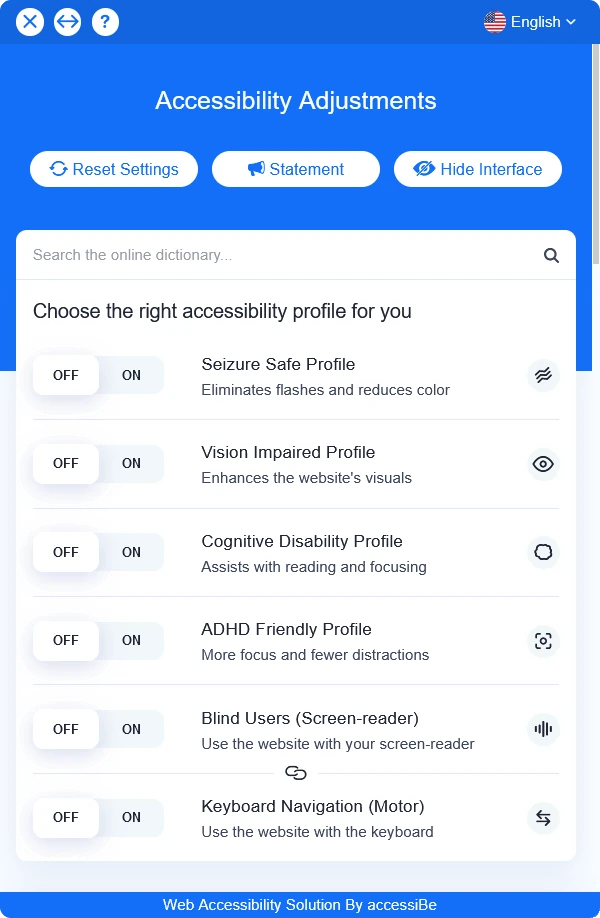
  • accessWidget. A panel on your site where a visitor chooses adjustments. It has six profiles: seizure safe, vision impaired, cognitive disability, ADHD friendly, screen reader, and keyboard navigation. Behind it, automation adds ARIA attributes and image descriptions and rescans the site every 24 hours.
  • accessFlow. A tool for developers. It scans pages and user flows, watches for new issues as code changes, suggests fixes, and connects to ticketing and build systems.
  • accessScan. A scanner that reports where a page stands.
  • Expert services. Manual audits, testing with real users, VPAT documentation, file and PDF remediation, and litigation support.

The widget is what most people picture. The developer tool and the expert services are where the lasting fixes come from.

The accessWidget panel, titled Accessibility Adjustments, with on and off switches for six profiles: seizure safe, vision impaired, cognitive disability, ADHD friendly, blind users with a screen reader, and keyboard navigation
The accessWidget panel a visitor opens on the site. Image: accessiBe.

What it does

What accessiBe Adds to an Accessibility Program

Each piece does a different job. None of them replaces accessible code.

  • Adjustments for the visitor

    Through accessWidget a shopper can switch on a profile that suits them: one that removes flashes, one that enhances the visuals, one with fewer distractions, or a mode for a screen reader or a keyboard.

  • Automated fixes in the background

    accessWidget adds ARIA attributes and AI-written image descriptions to help assistive technology read the page. Useful cover while the theme itself is being repaired.

  • Monitoring

    accessWidget rescans every 24 hours, and accessFlow watches for new issues as code changes, so a new banner or app does not quietly undo earlier work.

  • Tools for developers

    accessFlow scans pages and user flows, proposes code fixes with WCAG guidance, and sends issues into the ticketing and build systems a team already uses.

  • People

    A manual audit by specialists and testing by people who use assistive technology every day find what no scanner can.

  • Documentation and support

    A VPAT when a buyer asks for one, remediation for PDFs and other files, and litigation support on qualifying plans if a demand letter arrives.

What we do

What MAK Digital Does

The barriers that stop a sale live in the theme: menus, filters, product options, forms. Fixing those is development work, and it is ours.

  • Audit of the buying path

    We test navigation, search, filters, product pages, cart, checkout, and account pages with a keyboard and a screen reader, on desktop and phone, and include the third-party widgets that sit on them.

  • Code fixes

    Headings, labels, focus order, contrast, error messages, announcements when the cart changes: we fix them in the templates, where the fix holds for every page built from them. This is part of our eCommerce UX work.

  • accessWidget, installed with care

    We add the widget, match it to the brand, keep it clear of the cart and chat buttons, and check that it does not conflict with theme scripts or slow the page.

  • Accessible from the first design

    On a new build or a redesign, accessibility is designed in: color, type, components, and states. It costs less than repairing it later. See eCommerce web design and responsive design.

  • Content and media

    We set up the fields and guidance your team needs to write image descriptions, and arrange captions for video and remediation for PDFs, the items accessWidget does not cover.

  • Maintenance

    Accessibility slips with every release, upload, and app install. We retest on a schedule, after major changes, and keep an accessibility statement on the site current.

Tools and people

What a Tool Can Do and What Still Needs a Person

A fair division of labor for an online store. The right-hand column is why a widget alone is never the whole answer.

Accessibility barriers on an online store: tools and people
BarrierWhat a tool can doWhat still needs a person
Text too small or low in contrast for a visitorLet that visitor switch on a vision profileDesign with sufficient contrast and readable type to begin with
Images with no descriptionAdd an automated descriptionWrite what the photo shows that matters for buying the product
Menus, galleries, and filters that fail with a keyboardFlag the component, and adjust some behaviorRebuild the component so focus and order are right
Checkout fields without labels or clear errorsFlag the fieldsFix the form, then test it with a screen reader
Video without captionsNot covered by accessWidgetCaption the video
PDFs such as manuals and spec sheetsNot covered by accessWidgetRemediate the file, or publish the content as a web page
Third-party widgets: reviews, chat, financingFlag the problemsHave the vendor fix it, or choose a vendor that has

accessiBe states that accessWidget cannot create video captions or remediate PDFs (accessibe.com, October 2026). The rest reflects how we divide the work on client stores.

Checklist

What We Check and What You Have at the End

The audit follows a shopper from the homepage to the order confirmation.

What we check on a store

  • The main menu and its flyouts, by keyboard
  • Search, suggestions, and filters
  • Product pages: images, galleries, options, quantity
  • Cart updates and how they are announced
  • Checkout labels, instructions, and error messages
  • Third-party widgets: reviews, chat, financing, shipping

What you have at the end

  • A list of issues in order of how badly they block a purchase
  • Fixes made in the theme, not layered on top of it
  • accessWidget configured, if you choose to use it
  • An accessibility statement on the site
  • A retest schedule tied to your releases
  • A path to a VPAT or an expert audit through accessiBe when a buyer asks

How it runs

An Accessibility Project in Four Steps

The order matters: find the barriers, fix the code, then add tools on top.

  1. Audit

    We test the buying path by hand and with scanners and rank what we find by its effect on a purchase.

  2. Fix

    Our developers repair templates and components, starting with whatever blocks checkout.

  3. Add tools

    accessWidget for visitor adjustments and monitoring, and accessiBe's expert services where documentation or independent testing is needed.

  4. Maintain

    We retest after releases and on a schedule, and train your team to keep new content accessible.

Questions About accessiBe and Accessibility

Direct answers, including the ones a sales page usually avoids.

Does accessWidget make my store ADA compliant?

Not by itself, and no tool does. In April 2025 the FTC finalized an order barring accessiBe from claiming its automated products can make a website WCAG compliant without evidence, and accessiBe states that accessWidget cannot fix some errors, such as video captions and PDFs. A widget can help visitors and cover some gaps. The barriers in your theme still have to be fixed in the code.

Then why use accessiBe at all?

Because parts of it are useful. The widget gives visitors adjustments they can choose. Monitoring catches regressions. accessFlow helps developers find issues before release. The expert audits, user testing, and VPATs provide independent evidence that we, as the people who built the store, cannot provide about our own work.

What standard should an online store meet?

The ADA does not give private websites a technical checklist, so most audits use WCAG 2.1 Level AA as the benchmark, and many organizations are moving to WCAG 2.2 AA. Stores that sell into the European Union also fall under the European Accessibility Act, which has applied since June 2025. This is general information, not legal advice. Our guide to ADA compliance for online stores goes deeper.

What does accessWidget cost?

accessiBe lists plans starting at $490 a year at the time of writing, with higher tiers for larger sites and custom pricing for enterprises. Expert services are quoted separately. Current prices are at accessibe.com.

Will the widget slow down my site?

Any third-party script adds weight. We load it so it does not hold up the page, then measure before and after. You can test your store now with our free website speed check.

Can you fix accessibility in our theme code?

Yes. That is most of the work. We fix templates and components on BigCommerce, Shopify, WordPress, and Magento so the fix applies to every page built from them. Start with our guide to making a website more accessible if you want to see what is involved.

Does MAK Digital earn money if we buy accessiBe?

We may. accessiBe pays partners a recurring commission on subscriptions they refer, and we are a partner. It does not change our advice: fix the code first, and add a tool only where it helps your customers.

How do we start?

With an audit of the buying path. Request a quote and tell us your platform and whether you have received a complaint or a demand letter, because that changes the order of the work. A broader website audit can include accessibility with speed and SEO.

Want to Know Where Your Store Stands?

Tell us your platform and what prompted the question. We will audit the buying path and tell you what blocks a purchase, what we would fix first, and where a tool would help.

See all technology partners

More on User Experience and Accessibility

From the eCommerce Experts

Read Our Blog

Start Your Project With Us

Share some details, and our team will follow up.

Please write at least 20 characters.

Click to upload or drag and dropUp to 5 files, 10 MB each

    Get the MAK Digital Newsletter

    eCommerce design, development, SEO, and marketing insights, a few times a month. No spam, unsubscribe any time.

    By subscribing you agree to our privacy policy.