1-888-553-8776
 Eashan Mehta
Seventy percent of online shoppers add items to their cart and leave without buying, according to recent studies. This massive rate of abandoned carts isn’t casual browsing, nor is it simple comparison shopping. Instead, these are people who were interested enough to click “add to cart” but were stopped by something preventing them from finishing the purchase.
Every abandoned cart represents a problem you can fix. Perhaps your shipping costs surprised them at checkout. Alternatively, the process might have felt too complicated, or your site simply loaded too slowly on mobile. Regardless of the specific reason, that shopper was ready to give you money, yet something got in the way.
The good news? Mostabandoned carts problems are fixable. You don’t need a complete site redesign or a massive budget. Rather, you need to understand why people are leaving and systematically remove those obstacles. This guide walks through the most common reasons shoppers abandon carts, the fixes you can implement right now, and how to recover sales from people who already left. Let’s turn those abandoned carts into completed orders.
Why Shoppers Abandon Carts (The Real Reasons)
Unexpected shipping costs kill more sales than almost anything else. A customer sees a product for $50, adds it to cart, and suddenly the total is $65 at checkout. They feel misled and leave. Forced account creation stops buyers in their tracks. Someone ready to purchase has to create a username, set a password, and verify email before buying. Many just close the tab instead.
Complicated checkout processes with multiple pages and dozens of form fields give customers more chances to reconsider. Payment security concerns matter too. If your checkout doesn’t look trustworthy, shoppers hesitate to enter credit card information. Mobile checkout problems compound everything with small buttons, slow loading, and forms that break autofill.
Some people are genuinely just browsing. But the data shows preventable friction causes most abandonments. Fix the friction and conversions climb immediately.
Quick Wins You Can Implement Today
Show Total Cost Early
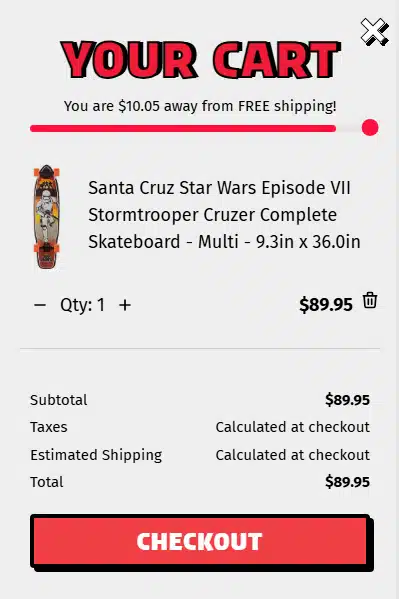
Skate America Free shipping progress bar
Start by displaying shipping costs on product pages or immediately when someone adds an item to cart. You should calculate the full total before they reach checkout. No surprises means fewer abandonments. If shipping is expensive, show it upfront. Consequently, customers who proceed knowing the cost are far more likely to complete the purchase than customers who feel ambushed at the last step.Consider adding a free shipping progress bar to your side cart that shows exactly how much more they need to spend to qualify for free shipping. Messages like “Add $15 more for free shipping” turn shipping costs into an incentive instead of a surprise, often increasing your average order value in the process.
Simplify Your Checkout
Specifically, guest checkout is required, not optional. Let people buy without creating an account. Therefore, reduce form fields to the absolute minimum: name, email, shipping address, and payment. That’s it.
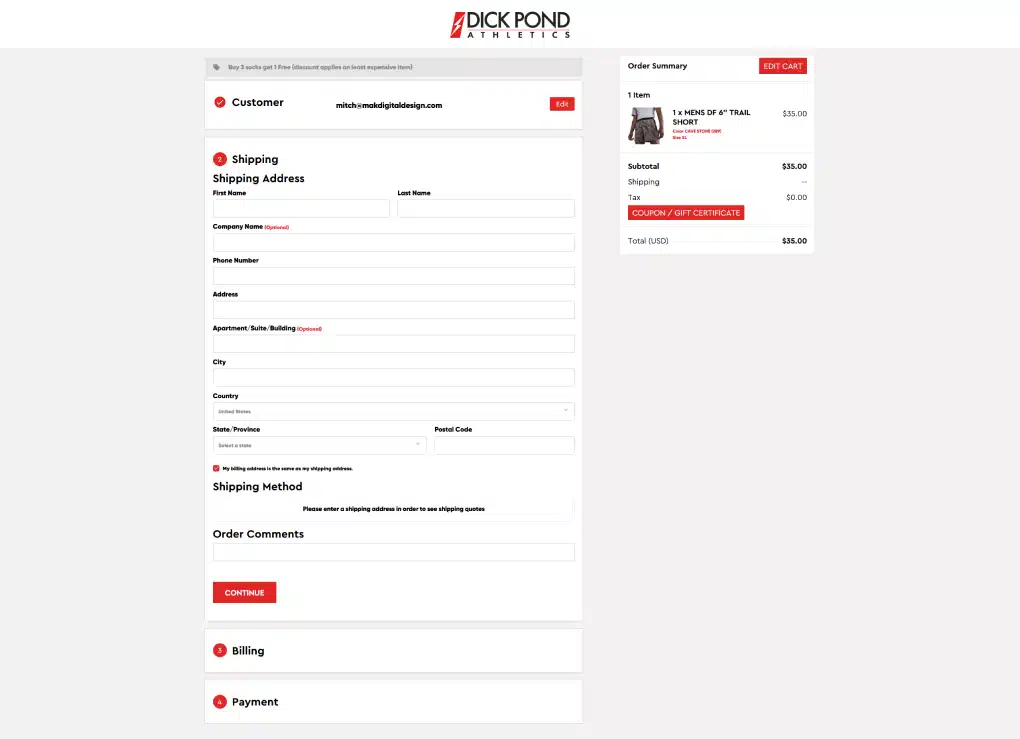
Dick Pond Athletics simplified one-page checkout process
One-page checkout generally works better than multi-step processes when possible. If you must use multiple steps, show clear progress indicators so customers know how close they are to finishing.
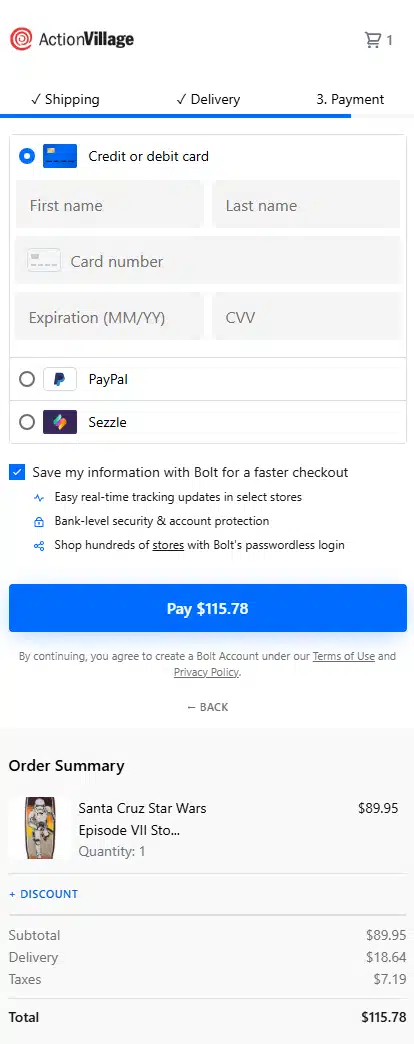
Fix Mobile Checkout
Also, test your checkout on actual phones, not just on a desktop. Make buttons large enough to tap easily. Furthermore, support autofill so customers don’t have to manually type addresses. Add mobile payment options like Apple Pay, Google Pay, and Shop Pay. These cut checkout time to seconds and work better than traditional forms on small screens.
Add More Payment Options
However, credit cards aren’t enough anymore. You should offer PayPal, Venmo, and buy now, pay later services like Afterpay, Klarna, or Affirm. Check your analytics to see what your customers actually use and prioritize those options accordingly.
Build Trust at Checkout
To build confidence, display recognizable security badges. For instance, show your return policy clearly and make customer service contact information visible. Ensure your SSL certificate is active and the padlock appears in the browser. These signals tell customers it’s safe to complete their purchase.
Measuring What’s Working
To begin with, track your abandonment rate by device. If mobile abandonment is significantly higher than desktop, you know where to focus. Most eCommerce platforms show you exactly which checkout step loses the most people. For example, if everyone drops off at shipping selection, that’s your problem area.
Meanwhile, monitor recovery email performance. Open rates, click rates, and conversion rates tell you which messages work and which get ignored. Make sure to A/B test changes one at a time so you know what actually made a difference. If you change shipping display and checkout flow simultaneously, you won’t know which fix worked.
Additionally, use Google Analytics alongside your platform’s built-in analytics. Look at funnel visualization to see the exact drop-off points. Track how changes affect your overall conversion rate, not just abandonment recovery.
Finally, set realistic goals. You won’t recover 100% of abandoned carts since some people genuinely aren’t ready to buy. However, aiming for 15-20% recovery through email and optimization is solid. Reducing your overall abandoned carts rate by 10-15% through checkout improvements is a meaningful win that directly impacts revenue.
Common Mistakes That Make It Worse
Sending Too Many Emails
First, sending too many recovery emails crosses the line into harassment. Three emails are the maximum. More than that, and you’re annoying people who already decided not to buy.
Discounting Too Early
Similarly, offering discounts too quickly trains customers to abandon carts intentionally. If your first email includes 10% off, shoppers learn to add items and wait for the discount code. Instead, save incentives for the third email or don’t use them at all.
Ignoring Mobile Checkout
Another common error is ignoring the mobile experience while optimizing desktop, which wastes effort. Since most traffic comes from phones, if checkout doesn’t work smoothly on mobile, your fixes won’t matter.
Complicated Return Policies & Long Checkouts
Furthermore, complicated return policies create doubt at checkout. Make returns simple and state the policy clearly. Also, avoid making checkout longer by adding unnecessary steps, as this defeats the entire purpose. Every extra field or page increases abandonment.
Not Testing Payment Errors
Lastly, not testing payment processing errors means you don’t know when checkout actually breaks. Test your payment flow regularly. Otherwise, a broken payment processor can cost you days of sales before you notice.
Stop Losing Sales to Fixable Problems
Ultimately, abandoned carts aren’t inevitable. They’re symptoms of specific problems you can identify and fix. Start with the quick wins: show shipping costs early, add guest checkout, simplify your forms, and make sure mobile works smoothly. Then, layer in recovery emails for people who leave. Don’t forget to test your changes and measure what actually moves your conversion rate.
In fact, every percentage point you reduce abandonment directly increases revenue. The difference between a 70% abandonment rate and a 60% rate is significant money left on the table. Most stores can make meaningful improvements in a matter of weeks once they know what’s broken.
However, if you’re not sure where your checkout process is failing or which fixes will have the biggest impact, MAK Digital can help. We conduct UX audits that identify exactly where shoppers are dropping off and why. We’ll show you which changes matter most and help you implement them. Let’s talk. We can audit your site and show you which improvements will recover the most sales.